Kinder/TK Enrollment
Enrollment Procedures
STEP 1
Enroll online/Register online by clicking here. This link can be used for all students enrolling at Golden Elementary - not just Kindergarten or Transitional Kindergarten.

Please attach the following documents to your online enrollment:
- Driver's license
- Address verification (copy of your electric/gas/water bill with current address)
- Your child's birth certificate
- Updated immunization records
STEP 2
After you enroll, you will receive a confirmation from our Golden office that they received your enrollment. You may be sent out additional forms to complete at this time.
Thank you so much!
Warmly,
The Golden Office Staff
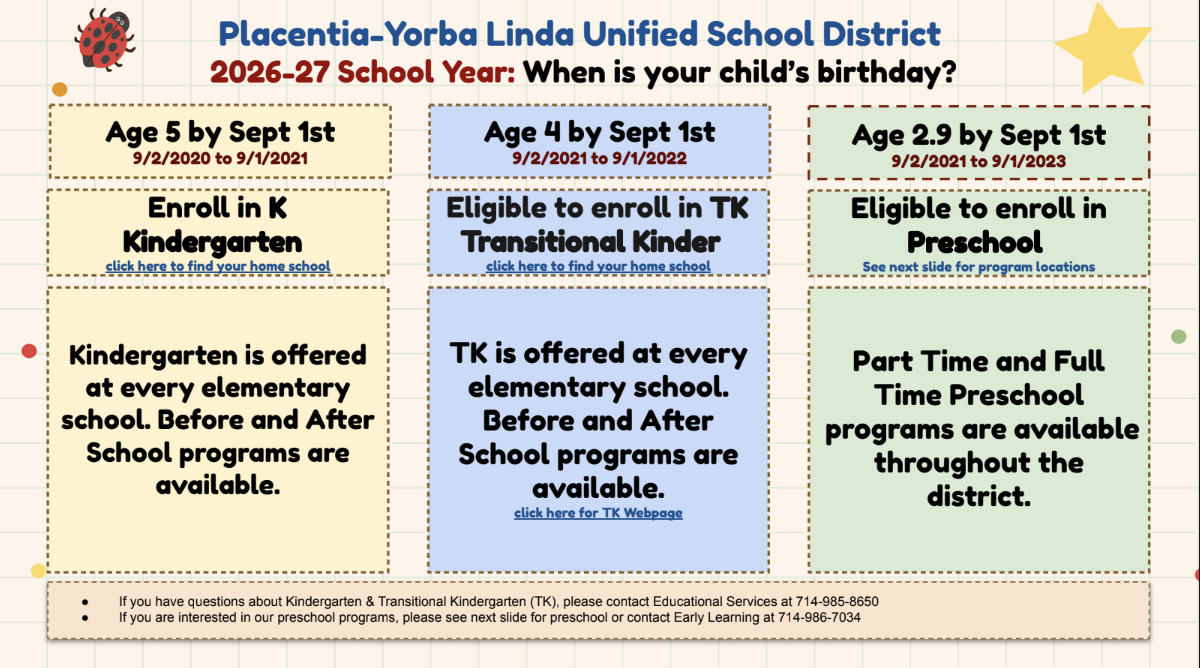
Transitional Kindergarten
Transitional Kindergarten (TK) represents a true bridge between preschool and traditional kindergarten. Taught by a credentialed teacher with early childhood expertise, TK uses a unique, specialized curriculum that is aligned to the California Preschool Learning Foundations & Frameworks and is designed explicitly to support the social-emotional, physical, and academic needs of young learners. The TK environment includes many opportunities for social-emotional development, fine- and gross motor activities, and oral language development for all kinds of learners. PYLUSD’s TK program prioritizes purposeful, structured play, small-group instruction, and intentional teaching using hands-on, experiential activities. TK truly provides our youngest learners with the gift of time, enabling all students to begin traditional kindergarten ready to thrive.
For additional information, please see Transitional Kindergarten (FAQs).
Child Care Information
Please set up your profile in Eleyo via the button below and add a contract to your account. Pending contracts will serve as your child's place on the waitlist.

How to Create an Eleyo Account - Registration Directions
Creating Your Family Account Profile
Placentia-Yorba Linda Expanded Learning is transitioning to a new online tool to register and manage your Child Care account. Below are some tips for creating a family profile.
- Once you have navigated to that page, select Sign In in the upper-right of the screen. The Eleyo sign in Screen is displayed.
- In the lower-right, select Create One Now. The Register a New Account page is displayed.
- Note: This registration page is for your personal information. You will be able to enter your child or other family members after you finish setting up your account.
- Required fields: All fields marked with an asterisk (*) are required.
- In Account Info, enter the email address and password you wish to use for this login.
- In Your Info, enter your first and last name.
- If desired, complete the Optional Info section.
- In Contact Info, complete all required fields.
- Phone including indicating Type.
- Indicate whether or not to receive text messages (texts can be used to notify you upon emergencies, school closures, cancellations and more - carrier and data rates may apply).
- Address including Address Type.
- Select Create Account to complete your registration. Your account profile is displayed.